USB Audio Player PRO
eXtream Software DevelopmentMusic & Audio
4.01.36K Reviews
- Version
- 7.1.2.3
- Installs
- 100.00K
- Age Rating
- Everyone
Screenshots
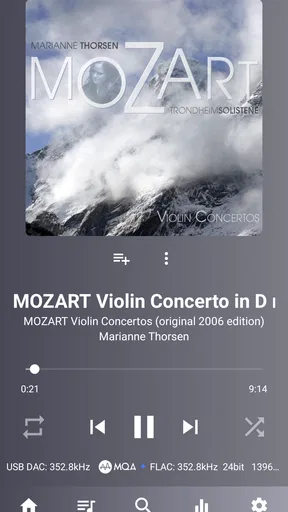
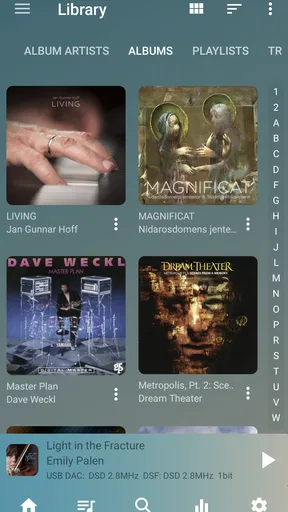
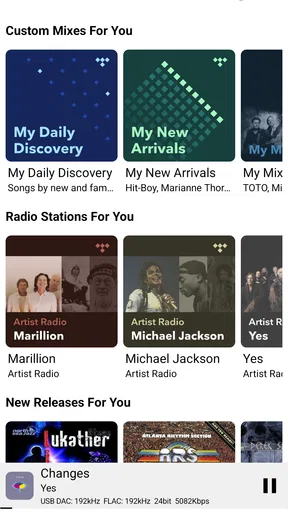
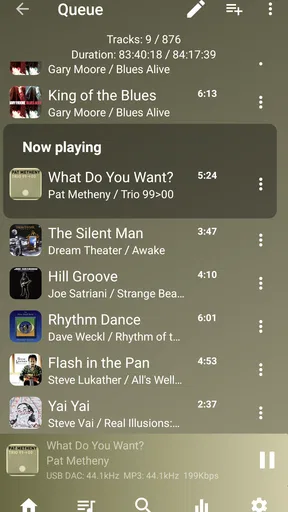
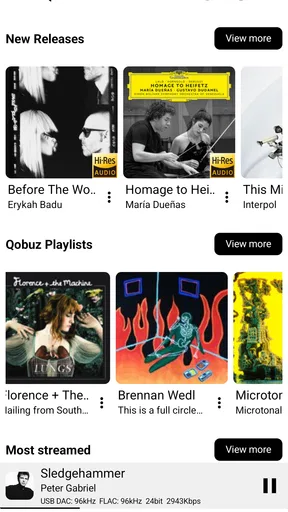
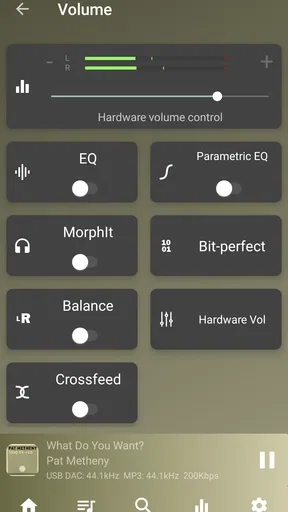
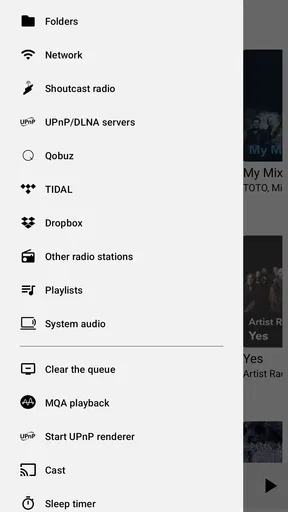
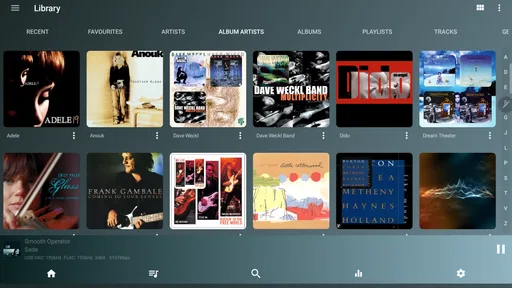
Our Review of USB Audio Player PRO
 Analysis by Appyee
I judge USB Audio Player PRO less by the promise of “better sound” than by whether it solves a particular listening problem: getting a local music library through Android without giving up control of the audio path. For that job, it has a clear purpose and a lot to offer. It is a paid Android music player from eXtream Software Development, aimed especially at people who own lossless files or use an external USB DAC. If you mostly listen to compressed tracks through a phone speaker, though, its specialist strengths may matter less than the extra setup and cost.
Who benefits from its audio-first approach
The key question before buying is not whether high-resolution audio sounds impressive in theory, but whether your listening setup can make use of the app’s particular approach. A compatible USB DAC and a carefully organized local library give it a more convincing reason to exist than casual listening on whatever headphones happen to be nearby. Without those, a familiar music app may be simpler and perfectly satisfying.
I would look at it if I keep FLAC or DSD files on my device, want a dedicated player for them, or regularly connect a USB DAC. Its focus is narrower than an all-purpose streaming service: the appeal is control over local playback and audio hardware, not discovering a huge catalog or managing every kind of media in one place. That distinction helps set expectations before paying.
A practical way to judge the purchase is to start with the gear already in your routine. If I listen through a USB DAC at a desk or with wired headphones, I can test whether this player’s separate audio path makes that setup easier to use. If I stream casually while commuting and rarely notice changes between players, I would not buy it simply because a format name sounds more advanced. The benefit depends on the whole chain—source file, playback route, DAC, headphones, and listening environment—not the app alone.
Unleashing the Power of High-Resolution Audio
First things first, USB Audio Player PRO is all about delivering high-resolution audio. If you're like me and have a collection of FLAC or DSD files just waiting to be unleashed, this app is your best friend. It supports an impressive range of formats, ensuring no audio file is left unplayed. Whether it's WAV, FLAC, MQA, or DSD, this app handles them all with ease.
That broad format support is useful when a library has been collected over time from different sources. Instead of maintaining one player for ordinary lossless files and another for more specialized ones, I can use a single place to browse and play a mixed collection. Still, format support does not make every recording equally enjoyable: a well-mastered ordinary file can be more satisfying than a poorly mastered high-resolution one. I treat the extra formats as flexibility, not a guarantee that every track will sound better.
What really makes this app stand out is its ability to bypass Android’s audio limits. It uses its own audio engine and can connect to USB DACs, ensuring your music is delivered in pristine quality. Just plug in your DAC, and voila! You get a sound experience that feels like a live concert right in your ears.
In practice, I would check the complete connection before deciding that a track or setting is at fault: the phone, the DAC, the headphones, and the selected output all shape the result. A USB DAC also makes the setup less spontaneous than simply opening a player on the phone. That is a worthwhile trade if I already carry the hardware, but unnecessary friction if I want music to start instantly with no extra device to connect.
Interface and Usability
Navigating the app is a breeze. The user interface is sleek and intuitive, making it easy for anyone to jump in and start enjoying their music. You have your typical playlist management, but what I love is the seamless integration with streaming services like Tidal. This means you can enjoy both your personal collection and streaming tracks in high-res quality.
For someone choosing between this and a standard streaming app, the distinction is the balance between a personal collection and a service’s catalog. This player can bring local files and supported streaming into a listening routine, while a streaming-first app is usually the more natural choice for people who mainly want recommendations, playlists, and quick access to a broad catalog. I would make sure the services I actually use fit the workflow rather than assume every streaming habit transfers neatly.
There is also a small but useful library-management habit worth adopting: keep file names and folders reasonably consistent before importing or browsing a large collection. A player can only make a personal archive convenient when the underlying files are findable. I would begin with a handful of familiar albums, make sure the browsing and playlist approach suits me, and only then move my entire library into the routine. That avoids spending time tuning playback while still struggling to locate music.
One cool feature is the parametric equalizer. If you're someone who loves to tweak and customize your sound, this is a game-changer. You can adjust frequencies to your heart's content, tailoring the sound to exactly how you like it.
I find an equalizer most useful when I have a specific listening problem to solve, such as headphones that make voices seem recessed or bass that overwhelms quieter details. Small, deliberate changes are easier to assess than a dramatic curve, and I would save or note a setting before experimenting so I can return to a neutral starting point. If I prefer every recording to sound as its creator intended, leaving the equalizer alone is a sensible choice; the feature is optional, not a task the app demands.
Performance and Features
The performance of this app is top-notch. It runs smoothly without any hiccups, even when handling high-res files. There's no lag, no stutter—just pure, unadulterated audio bliss. The app even supports UPNP/DLNA, so streaming from your home network is a piece of cake.
UPnP/DLNA support is particularly handy when my music is stored on another device at home. It can make a listening session feel less tied to the phone’s own storage, which is useful if I keep a library on a home network and want to browse it from a listening spot. The trade-off is that network playback depends on the home setup being available and working; for a train ride or a place with unreliable connectivity, files stored locally are the safer plan.
One everyday scenario shows where the app’s strengths make sense: I get home, connect my phone to a USB DAC at my desk, and switch from a network library to a playlist of local albums without changing listening apps. I can adjust the equalizer only if a particular pair of headphones needs it, then leave the rest of the setup untouched. That is a more realistic benefit than expecting every song to transform; the payoff is having a player suited to a specific, repeatable listening routine.
Another feature worth mentioning is the bit-perfect playback. For those unfamiliar, this means the app plays your audio files without any alteration, preserving the original quality. Pair it with a good DAC, and you're in for an audiophile's dream.
Bit-perfect playback is most relevant when I want the digital signal left alone, not when I am actively applying equalization or other processing that changes it. That creates a genuine choice rather than a single universally best setting: choose a direct, unaltered path when preserving the source is the priority, or use adjustments when they make listening more comfortable. I would not treat the label as proof that one mode must sound better in every room, with every recording, or on every pair of headphones.
It is also worth remembering what the app cannot do for the recording itself. If a file is noisy, overly compressed, or simply not to my taste, a different playback path will not turn it into a different master. The most useful comparison is a familiar track played at a similar volume, with the same headphones and output, rather than swapping several parts of the setup at once. That makes it easier to tell whether a change is actually helping me.
Battery Consumption
Now, high-quality audio often comes with a price—and no, I’m not just talking about the app’s cost. The battery consumption can be a bit on the higher side, especially when using external DACs. But hey, it’s a small price to pay for exceptional sound quality, right?
That battery trade-off matters most if I rely on my phone through a long day away from a charger. Before a trip, I would decide whether the DAC and the higher-quality playback route are worth carrying and using for that session, rather than leaving the setup running automatically for every short listen. For a desk session, the extra drain may be easy to accept; for a day of navigation, calls, and music on one charge, a simpler listening setup may be the more comfortable choice.
The app itself is a paid purchase at $7.99, with in-app purchases listed from $2.99 to $4.99 per item. I would weigh that against how often I will use its specific tools, rather than compare it only with a free basic player. Its 4.1 average from around 14,000 ratings and more than 1,000 written reviews suggests many users find value in the specialist approach, but popularity does not tell me whether my own DAC, library, or listening habits will benefit. It has been available since December 2013, and version 7.1.0.8 is the current release; it requires Android 6.0 or later and is rated for Everyone.
There is a practical way to reduce purchase regret: first identify the feature I would use every week. If the answer is USB DAC playback, a large lossless library, or network access to music at home, the price has a clear purpose. If I cannot name a regular use beyond “maybe the sound will be better,” I would stay with my current player until I have a real need. The app has over 100,000 installs, but the right fit is still personal rather than a matter of following a crowd.
What to expect from setup and daily use
Will it work as a straightforward replacement for every music app? I would not count on that. Its strongest case is focused playback, so I would keep a streaming-first app if its discovery tools and broad catalog are central to how I listen. This player makes more sense as the place for a curated local library, DAC listening, or home-network playback than as a universal answer to every audio task.
Does using a USB DAC automatically mean better sound? Not necessarily. It gives the app a way to use external audio hardware, but the audible result depends on the recording and the rest of the equipment. I would try the same familiar track through the same headphones before and after changing the route, and listen at comparable volume. If I cannot hear a meaningful difference in my normal setting, I should not feel obliged to keep adding hardware.
What if I do not own high-resolution files? The app can still be useful for ordinary local music and its other playback options, but its most distinctive appeal is less compelling if I never use a DAC, network library, or audio controls. For someone who mostly asks a service to choose the next playlist, a conventional streaming app is likely easier and better matched to the job.
Can I use it away from home? Local files are the dependable choice when I expect to be offline. Network playback is convenient at home, where the library and connection are available, but it is not a substitute for having music stored on the phone when traveling. I would prepare an offline playlist before leaving rather than assume a home-network workflow will follow me.
Finally, is it right for a beginner? I think it can be, provided the listener is willing to learn what the audio settings and output choices do. The interface is approachable, but the app rewards curiosity more than a bare-bones player does. If I want a single button and no decisions, I would choose something simpler; if I enjoy making a setup fit my files and hardware, the extra control is part of the appeal.
Final Thoughts
In the end, USB Audio Player PRO is a must-have for anyone serious about their music. It’s packed with features that cater to audiophiles and casual listeners alike. Whether you’re using the app for its superior audio engine, wide format support, or simply to enjoy your favorite tracks in the best quality possible, it does not disappoint.
I would narrow that recommendation to people who will actually use its specialist strengths. The app is most convincing when I have local high-resolution files, a USB DAC, or a home-network library and want a player built around those needs. It is less compelling as an impulse purchase for someone who already enjoys casual streaming and does not want to manage audio hardware or settings.
So, if you find yourself yearning for better audio quality and have a penchant for high-resolution music, give this app a shot. Your ears will thank you, and trust me, you won’t look back.
My practical verdict is to buy it for a clear listening routine, not for an abstract promise of perfect sound. If the DAC connection, flexible file playback, network access, or equalizer will solve a problem I have today, the specialist focus is a real advantage. If none of those matters in my day-to-day listening, a simpler player is the smarter choice. For the right listener, though, this is a capable Android music player that puts the library and playback chain—not recommendations or social features—at the center.
Verdict
Strengths of USB Audio Player PRO
- High-resolution audio support.
- Wide range of file formats.
- Customizable equalizer options.
- Seamless network streaming.
- Gapless playback feature.
Limitations of USB Audio Player PRO
- Paid app with no free version.
- Complex interface for beginners.
- Limited support for older devices.
- Requires external DAC for best use.
- No cloud storage integration.
Other Releases by eXtream Software Development
View All
Audio Evolution Mobile Studio
Music & Audio4.3

USB Audio Recorder PRO
Music & Audio3.9
Similar Picks in This Category
View All
YouTube Music
Google LLC4.4

Samsung Music
Samsung Electronics Co., Ltd.3.8

Spotify: Music and Podcasts
Spotify AB4.3

JioSaavn - Music & Podcasts
Saavn Media Limited4.3

Lark Player:Music Player & MP3
Lark Player Studio - Music, MP3 & Video Player4.6

StarMaker: Sing Karaoke Songs
SKYWORK AI PTE. LTD.4.3
Frequently Asked Questions
What is USB Audio Player PRO and what devices is it compatible with?
USB Audio Player PRO is a high-resolution audio player designed for Android devices. It supports a wide range of audio formats and provides superior sound quality by bypassing Android’s audio system. It is compatible with most Android smartphones and tablets, and it works seamlessly with USB DACs for enhanced audio performance.
What audio formats are supported by USB Audio Player PRO?
USB Audio Player PRO supports an extensive range of audio formats, including FLAC, WAV, MP3, DSD, MQA, and more. It is designed to cater to audiophiles who demand high-quality audio playback, making it versatile for users with diverse audio collections.
Does USB Audio Player PRO require an internet connection to function?
USB Audio Player PRO does not require an internet connection for basic playback of local files. However, an internet connection is necessary if you wish to stream music from services like TIDAL, Qobuz, or access online radio stations. Offline playback is fully supported for stored files.
Is USB Audio Player PRO user-friendly for beginners?
While USB Audio Player PRO offers advanced features for audiophiles, its interface remains user-friendly. Beginners can easily navigate through its intuitive design, while more experienced users can dive into advanced settings to customize their listening experience. The app also provides detailed guides and support to assist new users.
Are there any additional costs after purchasing USB Audio Player PRO?
USB Audio Player PRO is a paid app, and the initial purchase provides access to most of its features. However, some premium features, like MQA playback or advanced streaming options, may require additional in-app purchases. Users should review these options to ensure they meet their audio needs.
